Everything Graftum does, and what each part replaces.
Seven parts of one app, from the first lead to Friday's pay run: what each one does, what it takes the place of, and what that is worth to a firm like yours, with the sums shown.
No card needed. Priced per company, not per person. Switch on only the parts you use.
How it fits together: one job, five steps
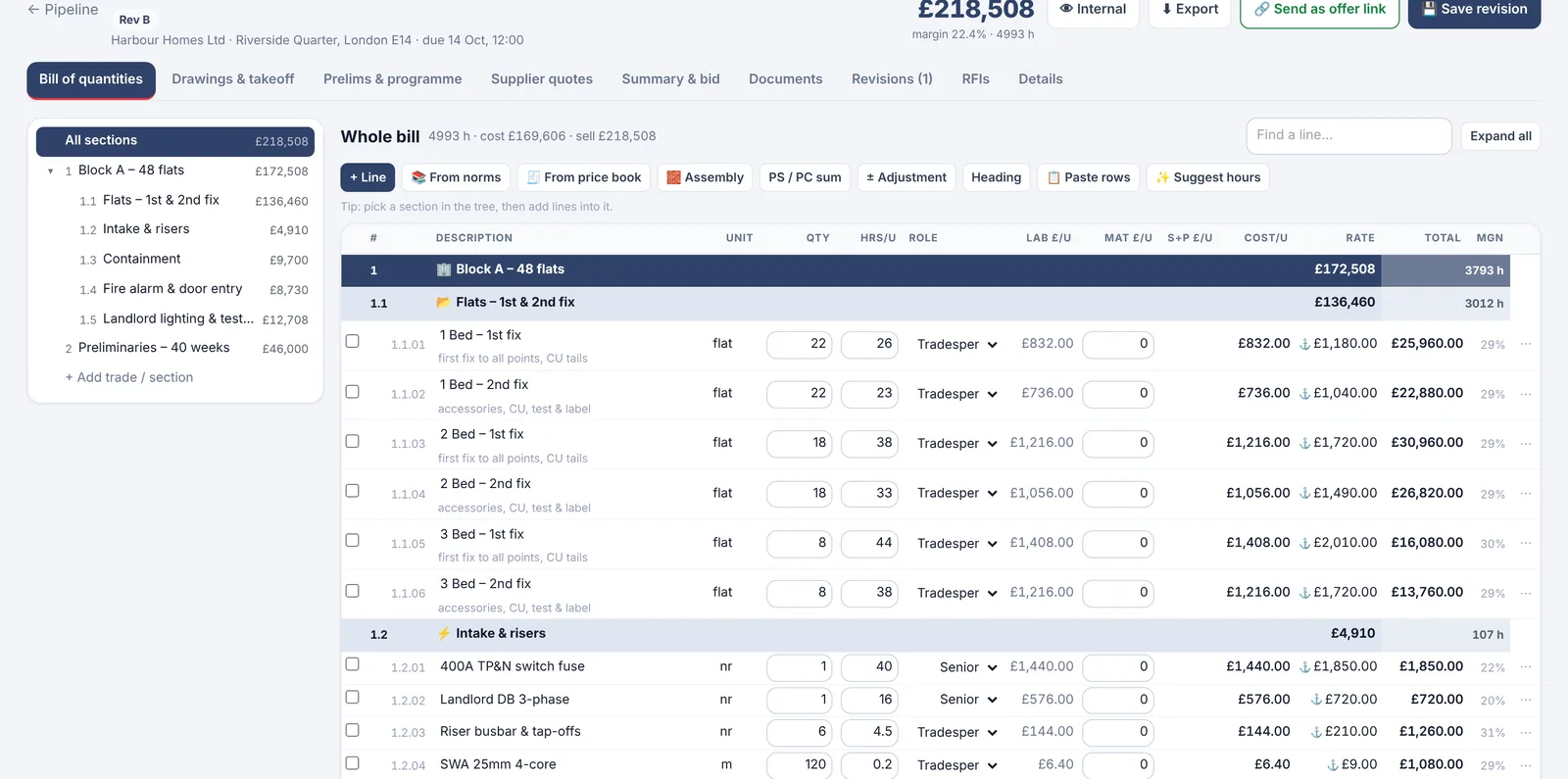
- Price it from the drawingsTake-off into a bill of quantities, labour norms fill the hours, margin on every line.
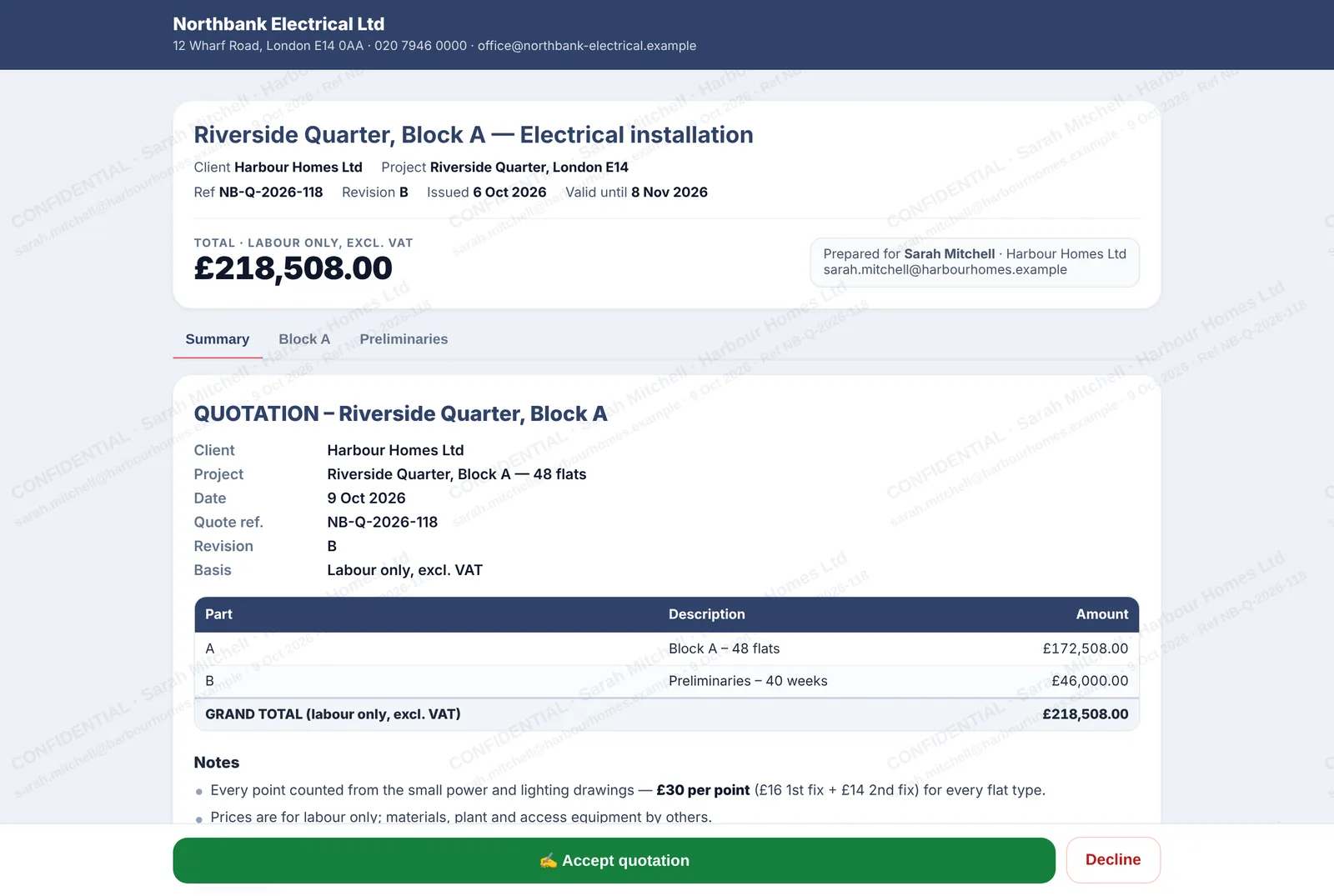
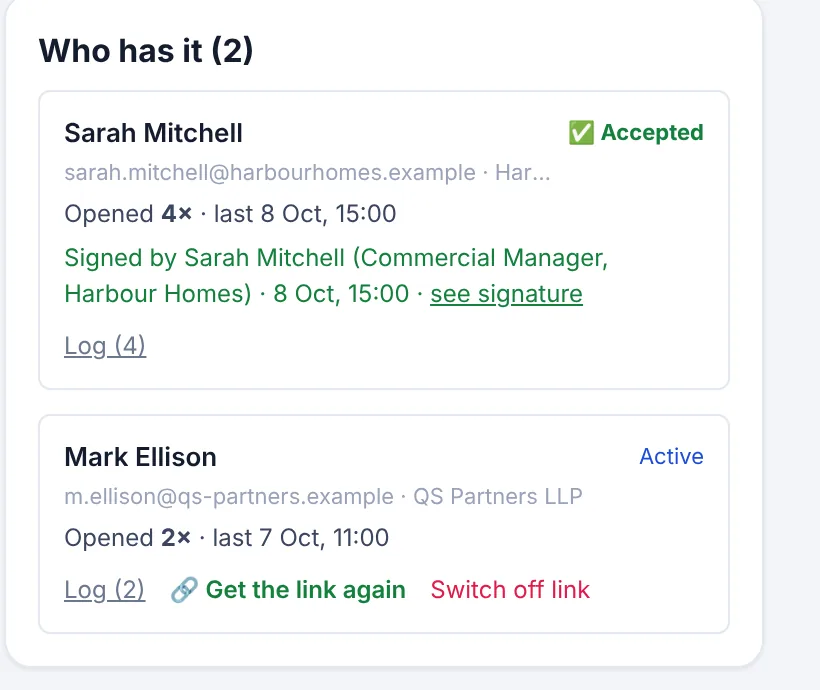
- Send it as a link they signNo file to pass on. You see every open; they accept with a signature.
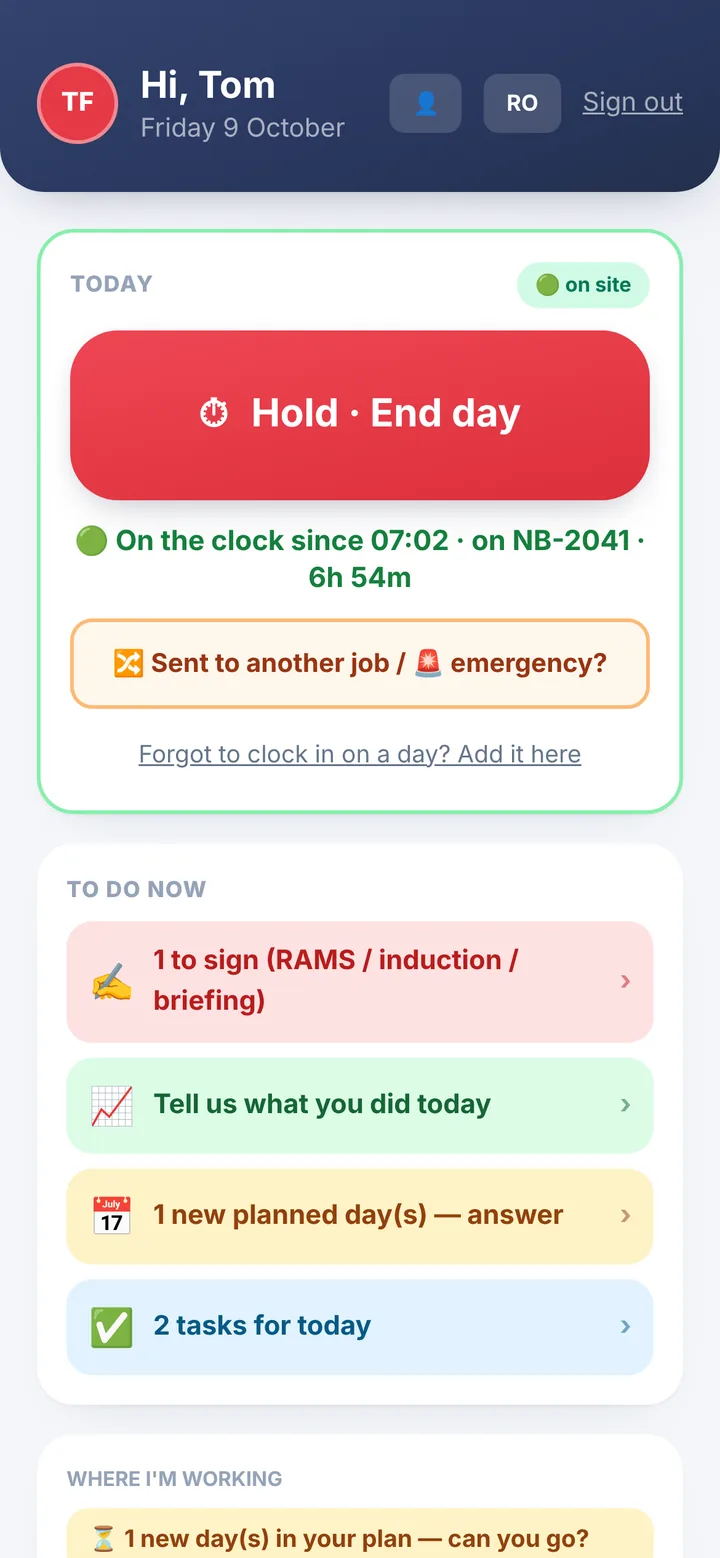
- Won: it becomes the jobContract lines, flats and budget carry over. The crew clocks in on the app and ticks off the work.
- The ticked work becomes the valuationRetention and previous payments off, Payment Notice and Pay Less dates worked out.
- The clock-ins become Friday's pay runDays, overtime and CIS per person, payslips and one bank file.
1 · Win work
Every enquiry priced from your own numbers, and a quote nobody can pass on
Leads, quick quotes, a price book, a full estimating desk with take-off on the drawings, and quotes sent as a private link the client signs on their phone.
- Replaces
- The quote spreadsheet, a highlighter on printed drawings, the Word template, and the PDF that gets forwarded to the next contractor.
- Saves
- Example: a 120-line bill retyped from Excel into a quote is an evening; one quote a year that walks to a rival is the whole margin on that job. Assumptions are in the table below.
- Leads before they become quotes, including homeowner enquiries from Graftum Jobs (at most 5 firms per enquiry) and packages from the Marketplace.
- Quick quotes with voice dictation, VAT and acceptance, built from your price book: your master labour and material prices, with assemblies you reuse.
- Tenders & BoQ: count, measure and mark up on PDF drawings; over 200 starter labour norms (most complete for electrical, plus plumbing, heating, HVAC, data, FM and builders' work), all editable; overheads, risk and profit at any level.
- Bring in the client's Excel bill and send it back priced in Excel with live formulas, or as a tender PDF; every revision kept with its totals.
- Quotes as a signed private link: the client's name and email across every page, copying off, PDF only if you allow it, every open logged, accepted with name, role and signature against the exact revision they read. Switch any link off in one tap.
- Won? One click makes the job, with contract lines, budgets, stages and labour hours already in.
Estimating and take-off in detail · How the signed link works
2 · Run the site
The day planned in the office, done and recorded from the crew's phones
Jobs, calendar and week board, daily tasks, a four-button crew app, paperwork signed on the phone, materials, site records for every trade and a live view of every flat.
- Replaces
- The WhatsApp group, paper RAMS in the van, photos of timesheets on a Friday, a separate clock-in app, and the whiteboard with this week on it.
- Saves
- Example: 15 minutes a week per person collecting and typing up hours is 2 hours a week for a crew of 8, about 92 office hours a year. Extra work signed on the spot is the difference at final account.
- Jobs with contract lines, budget, costs, team and paperwork in one place; calendar and week board to move work between days and people; daily tasks set in the office and ticked on site, plus a 17:30 email with tomorrow's plan.
- Crew app: Start day and End day with no signal (location stamped only at the tap, never tracked), photos, snags, material requests, and extra work signed by the site manager on the spot with a dated PDF to both sides.
- RAMS, inductions and daily briefings signed on the phone and stored per site; cards with expiry alerts and a verified ID pass per worker.
- Materials: requests with photos, packages tracked against budget, suppliers' price lists imported from Excel, and what is in the van and the store.
- Site records for every trade: pressure tests, heating and unvented commissioning, scaffold and excavation inspections, fire stopping, work sign-off, with photos and signatures. Electrical test sheets (EIC, EICR, Minor Works) typed on the phone, checked as they type, printed on the official IET forms.
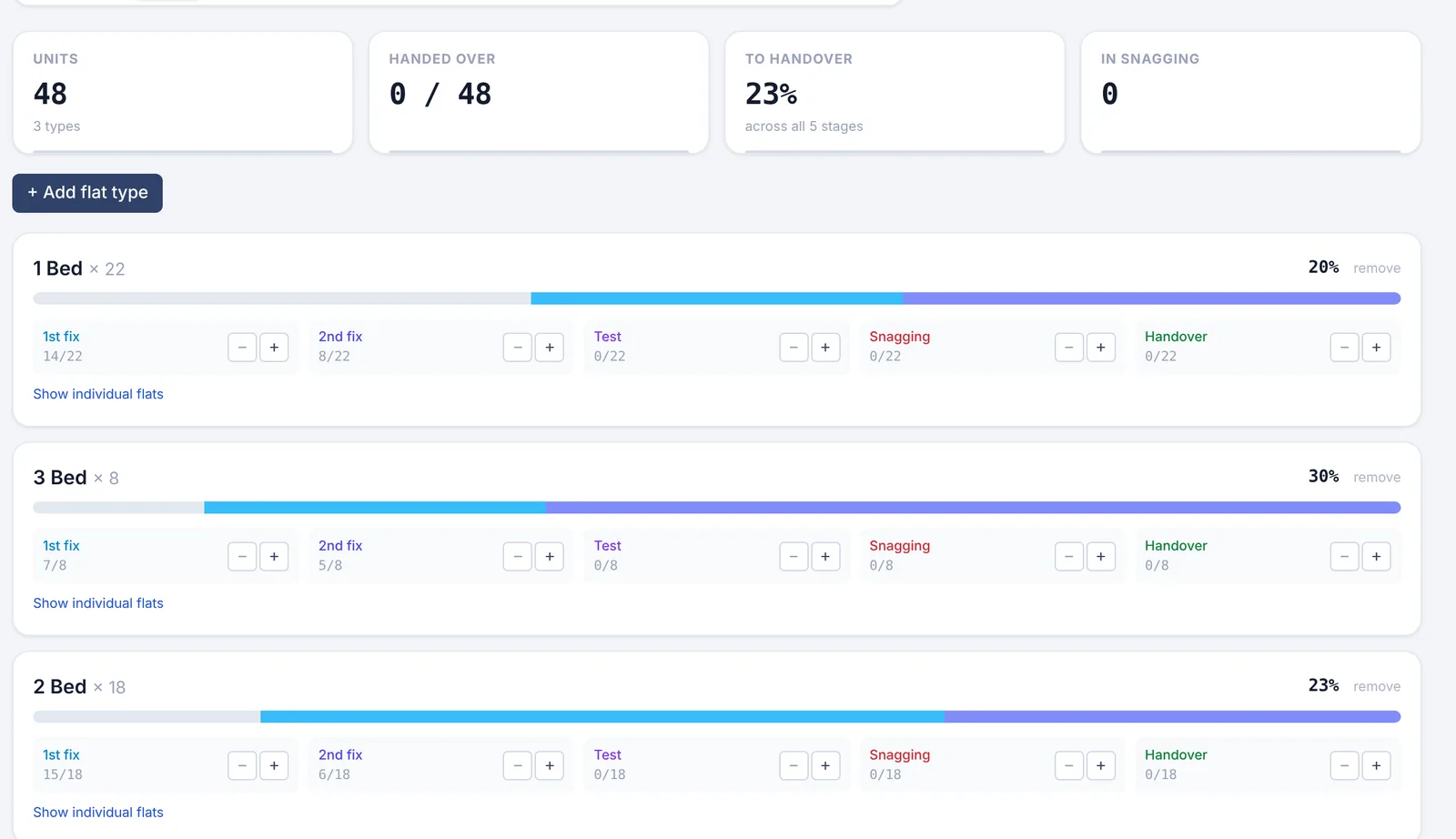
- Flats and zones through 1st fix, 2nd fix, test, snagging and handover; a weekly report of hours and progress; a client portal with progress, photos, variations and who is coming to site.
The crew app in detail · RAMS · Test sheets for electricians · Mobile apps
3 · Pay your people
Friday's pay run comes out of the week the crew already recorded
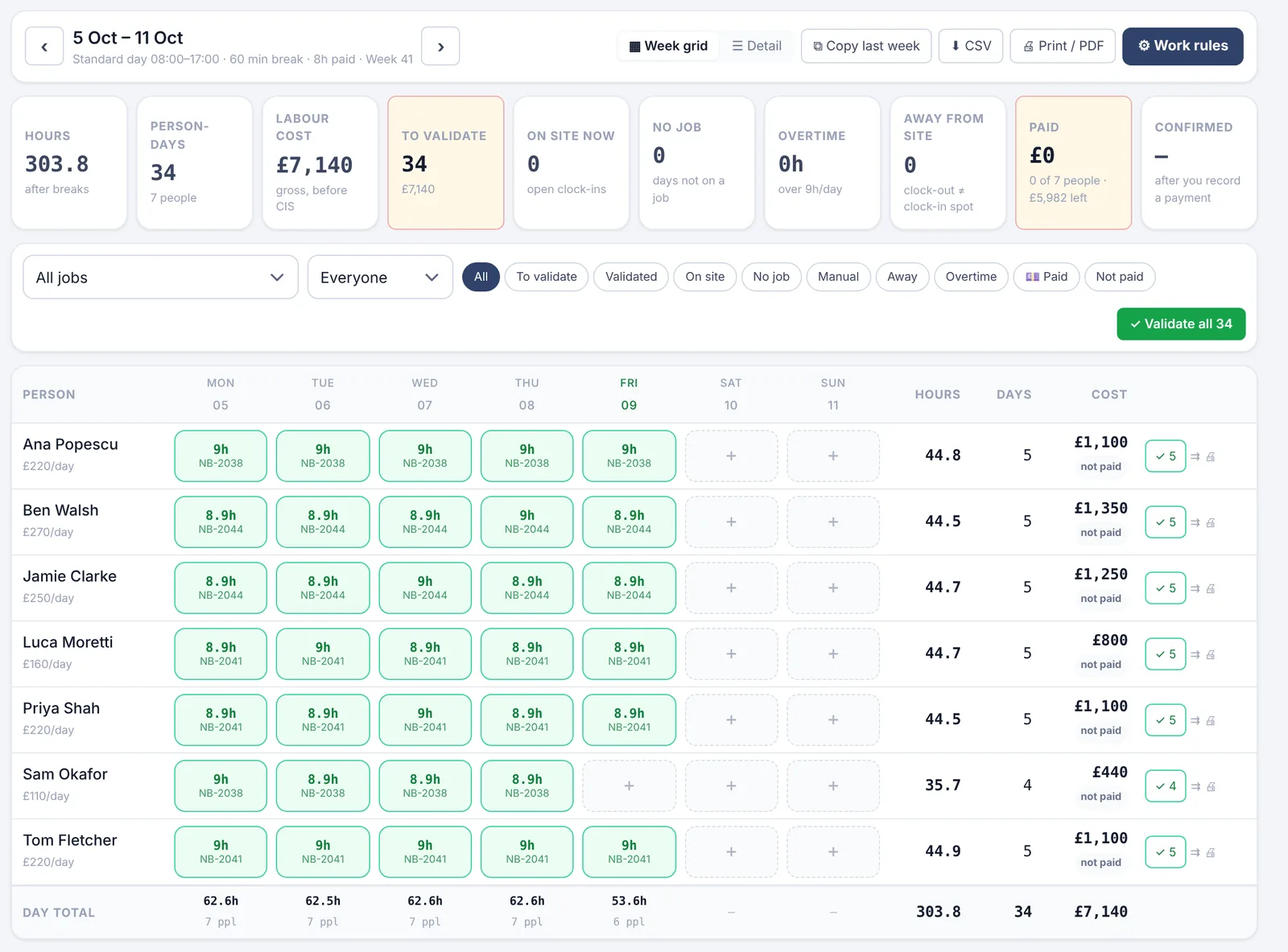
Team and roles, timesheets built from the clock-ins, CIS pay runs with payslips and a bank file, holidays, subcontractors, and every card with an expiry alert.
- Replaces
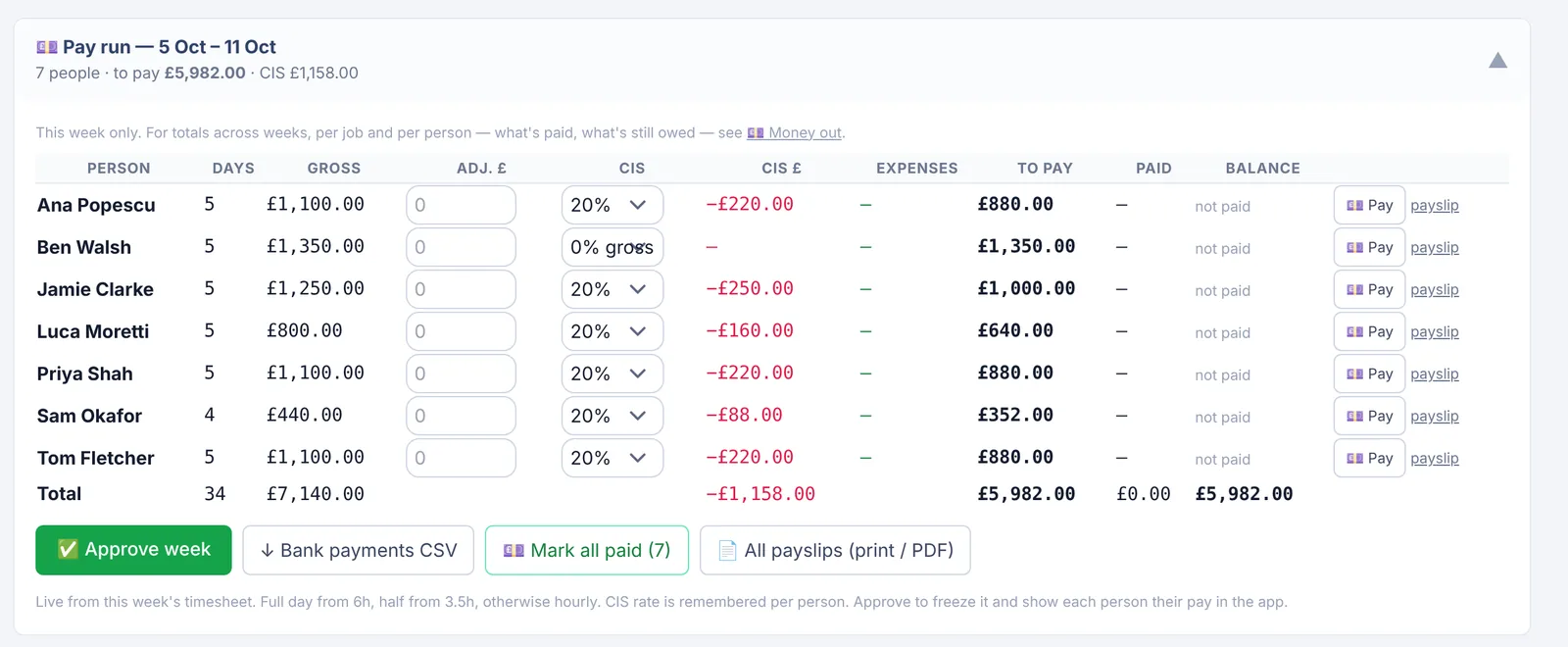
- The Friday-night spreadsheet, CIS worked out by hand per person, receipts in pockets, and the "how much am I getting?" calls.
- Saves
- Example: a pay run for 8 people built by hand takes about 1.5 hours a week; from checked timesheets it is a review and an approve. About 70 office hours a year.
- Team and roles: what each person can see, their rates and documents; paste the crew from WhatsApp or Excel and send one join link, with sign-up in seven languages.
- Timesheets from clock-ins: a week grid per person and job, odd days and missing clock-outs flagged, workers confirm their own week, paid weeks locked.
- CIS pay runs: day rates, half days or hourly, overtime and weekend multipliers, CIS at 20%, 30% or gross on every line, approved expenses added back, a payslip per person, a bank CSV for bulk payment, and the monthly figures for your CIS300.
- Holidays: requests from the app, approved in the office, who is off when.
- Subcontractors: their documents and their costs per job, with packages priced and tracked against budget.
- Cards and qualifications (CSCS, ECS and the rest) with alerts before they expire, so nobody is turned away at the gate.
4 · Get paid
Claim exactly what is done, on the day it is due, with signed evidence behind it
Valuations from the ticked work, the Construction Act dates on every application, invoices with reverse charge, card payments, signed day sheets, a cash forecast and profit per job.
- Replaces
- The valuation spreadsheet, a diary note for the Pay Less date, extras remembered at final account, and the invoice template.
- Saves
- Example: one £300 extra a month knocked off at final account because nobody signed it is £3,600 a year. One application paid a month late because the dates slipped is the finance cost on that sum, plus the chasing.
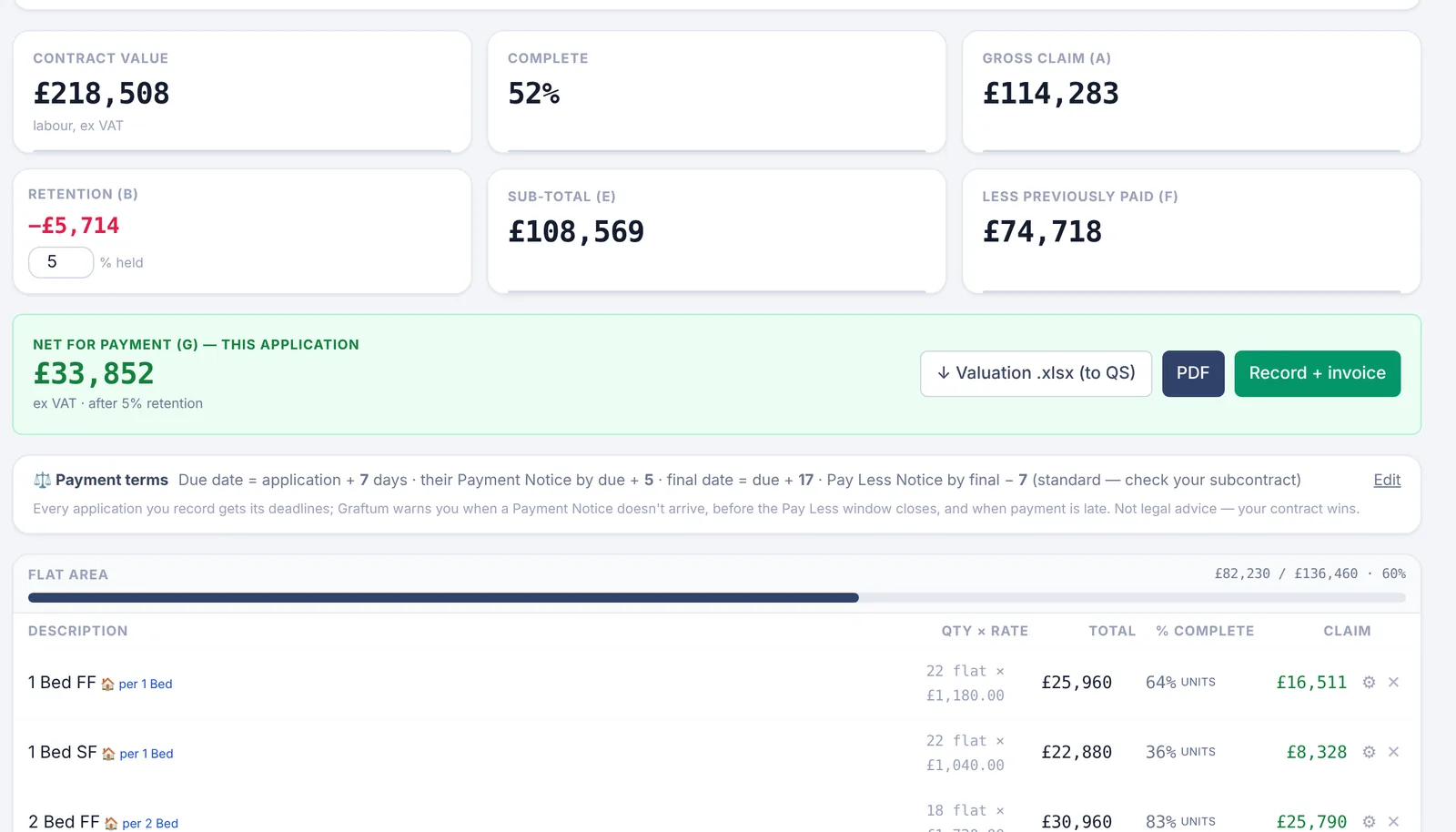
- Valuations built from the flats and contract lines ticked off on site, retention and previous payments taken off, to Excel or PDF for the QS.
- Payment Notice, Pay Less, due and final dates worked out for every application, with alerts when a notice is missing or a deadline is close.
- Invoices with VAT or domestic reverse charge; the client can pay by card through Stripe from the link, or sees your bank details if cards are not switched on.
- Signed day sheets and variations: recorded on site in under a minute, signed by the site manager on your phone, a dated PDF to both sides with a public verification link, then onto the next valuation.
- Cash: what comes in and goes out over the next six weeks, money out by week, job and person, overheads and what they add to every hour, and profit per job while it runs.
- Handover pack PDF: certificates, site records, electrical test sheets on the IET forms, client-visible photos, notes and warranties, assembled in one click at the end.
5 · Look after buildings
Every certificate, system and contract, with the cost of each callout the day it happens
For the maintenance side of a trade firm, or a firm that is all maintenance: certificates and renewals, system registers, contracts with live costs, a QR poster per building and a callout flow the client can watch.
- Replaces
- A loft of certificate folders, a renewals spreadsheet, phone tag with the concierge, and finding out in March which contract lost money.
- Saves
- Example: on a £45,000 annual contract, seeing in week ten that 30% of the value is spent against 20% of the year is a conversation you can still have. At year end it is a loss.
- Certificates you have issued, stored per job and searchable; the client downloads theirs from their job link. Renewals for everything that expires (certificates, cards, policies) with warnings before they do.
- Fire alarm, emergency lighting, CCTV and access control registers with test history, and an asset register per site.
- Maintenance contracts with live costs: contract value against spend, the pace line ("64% of the year gone, 81% spent"), a cost ledger per building, and a monthly client report in one click.
- A QR poster per building: the concierge scans it and reports a fault in 20 seconds with no account; the building turns red on your map and they get a tracking link.
- Callouts: assign the engineer, the client gets an SMS with the ETA and who is coming, the engineer fills the report on site, the client signs it on their phone and your office gets the signed copy by email. Repeating statutory visits (fire alarm tests, emergency lighting, EICR, legionella) create their own tasks seven days before they are due.
- EICR reminders to the client when the next inspection is due, with their consent, and their reply becomes a lead.
Graftum for maintenance and FM · Maintenance checklist · EICR and test sheets
A callout, from the lobby poster to the signed report
- ScanThe concierge scans the poster in the lobby and types the fault. No account, no app. Your map turns red.
- AssignOne tap puts it on your engineer's phone as today's task, against the building's contract.
- ETA by SMSThe client gets a text with who is coming and when, and a link that moves from Received to Being handled to Resolved.
- Report and signThe engineer fills the report on site with photos; the client signs it on their phone.
- Cost loggedLabour and materials land on the contract's ledger the same day, and the office gets the signed PDF by email.
6 · Grow
A public page with a real track record behind it, and people when you need them
Your profile and Verified badge, reviews, job ads, the crew list and talent pool, modules per trade, and your data in your hands.
- Replaces
- A recruiter's fee, a WhatsApp ad posted in six groups, a directory listing you pay for, and chasing customers for a Google review.
- Saves
- Example: in the agency week shown on our homepage, the agency keeps about £260 per worker per week. Finding the same person yourself on the crew list costs nothing.
- Public profile on graftum.com with the Verified badge: your public liability insurance is read by a person at Graftum, not a robot, and the same badge follows you into the directory, tenders and job ads.
- Reviews from homeowners whose enquiries you actually took, with your public reply; add your Google review link and every reviewer is offered your Google page too.
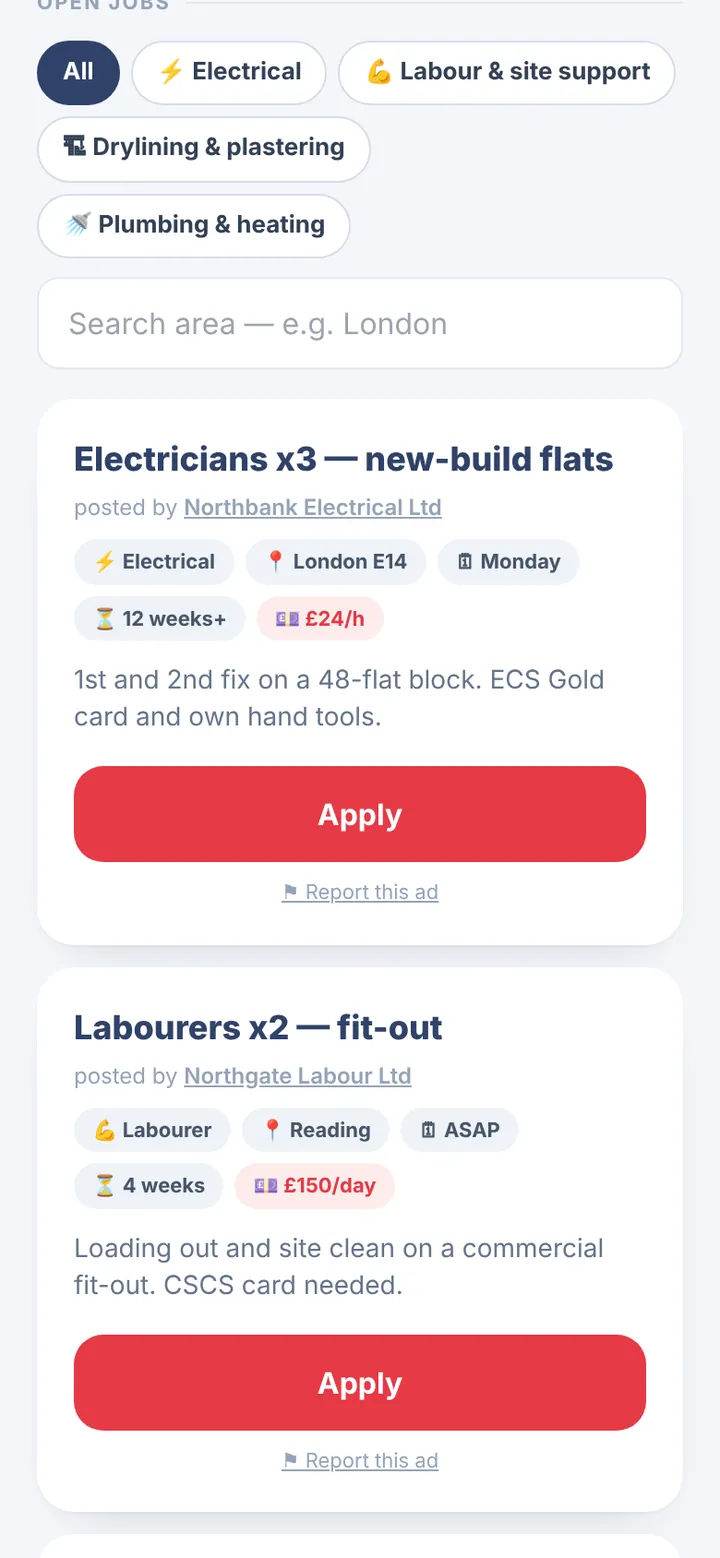
- Job ads: paste the ad you would send to WhatsApp, live in a minute, with a QR poster for the wall; workers in that trade near the site get a text and applicants land only in your account.
- Crew list and talent pool: people available now with trade, area and valid card types, and the workers who registered interest on your page; a reference from your firm goes on the worker's CV.
- Modules per trade: the menu, starting steps, norms and take-off items for electrical, plumbing and heating, drylining, roofing or groundworks, switched on when you sign up.
- Your data: export clients, quotes, jobs and photos any time; the app in English and Romanian, with sign-up and guides in seven languages.
Labour agencies · Security and your data · Electrical · Plumbing & heating · Drylining · Roofing · Groundworks
7 · Marketplace & Pocket, free
Where work and people find each other, on the same platform firms run their jobs on
Free for workers. Free for firms to post. Free for homeowners to get quotes. Graftum earns from the company app, so the marketplace never has to sell anyone's data.
Post a job free · The Marketplace · Verified firms · Free calculators
What it costs you today
An example, not a measurement: a firm with 8 people on site and one person in the office, office time at £25 an hour, 46 working weeks. Change the assumptions in each row for your own firm.
| Where it goes | The arithmetic | A year |
|---|---|---|
| Collecting and typing up hoursWhatsApp photos, paper sheets, chasing the missing ones | 15 min × 8 people = 2 h a week 2 h × 46 weeks × £25 | £2,300 |
| The pay run by handDays, overtime, CIS per person, bank payments typed in | 1.5 h a week × 46 weeks × £25 | £1,725 |
| Quotes retyped and chasedBill into quote, quote into job, "did you get my email?" | 1.5 h a week × 46 weeks × £25 | £1,725 |
| Unsigned extrasDay works done, remembered at final account, knocked off | 1 extra a month × £300 × 12 | £3,600 |
| Late noticesOne application a year paid a month late because the dates slipped | £30,000 × 8% a year ÷ 12, plus 3 h chasing × £25 | £275 |
| Admin hours, unsigned extras and late notices, for this example firm | £9,625 | |
| Graftum Crew for the same firmYear one: 3 months free, then 9 × £6 = £54. At the standard price: 12 × £59 = £708. Per company, not per person | £54 to £708 | |
Graftum does not remove every one of these hours. Somebody still checks the week and presses approve. But the hours come from the crew's own clock-ins, the extra work is signed on the day, and the notice dates are worked out for you, so most of the table goes. Prices exclude VAT; the founding offer applies to companies joining during early access. A late Pay Less notice from the payer means the sum applied for is due in full under the Construction Act, which is the other reason to know the dates.
Questions about what is in the app
Do I have to use all of it?
No. You switch on the parts you use in Settings, and the menu, the crew app and the client's view follow. Tell us your trade and set-up when you sign up and the right modules start switched on: an agency does not see take-off, a sole trader does not see pay runs.
What does Graftum not do?
It does not run PAYE payroll for employees (keep your payroll provider; their timesheets still work). It does not file the CIS300 return, it gives you the figures per subcontractor for you or your accountant to file. It does not read DWG files directly: export the drawing to PDF and take off from that. And it has no national price database: you price from your own supplier lists and norms.
Which parts are free?
The marketplace is free: getting quotes as a homeowner, posting a job, applying for one, the crew list and the work board. Graftum Pocket, the app for people on site, is free for personal use. The calculators and guides are free with no sign-up. The company app is free for the first three months, then priced per company.
Does it work on site with no signal, and on any phone?
Yes. Start day, End day and photos are kept on the phone and sent when signal comes back. The crew app is on the App Store and Google Play and also runs in any phone browser. The office side runs in a browser on a computer, tablet or phone, with nothing to install on a PC. More on the mobile apps.
Can I bring my data in, and take it out again?
Yes. Paste your crew from WhatsApp or Excel, import supplier price lists from Excel or CSV, and bring the client's or your own Excel bill into Tenders & BoQ. During early access we help you move clients, price book and open jobs ourselves. Your data stays yours: export clients, quotes, jobs and photos any time, and if you leave we hand everything over in standard formats. Our data guarantee.
How are the savings on this page worked out?
They are examples, not measurements. Each line shows its assumptions (how many people, how long a task takes, what an hour of office time costs) so you can put your own numbers in. A firm of three will save less than the example; a firm of twenty, more.
Switch on the parts you need and run the next job in Graftum.
Set up your company in three minutes. Price the next tender, send it as a link, and let the clock-ins do Friday. The first three months are on us.