On the App Store and Google Play Push notifications live since October 2026
The site runs from a phone
One Graftum app for everyone. Your crew clock in, read today's tasks, sign the RAMS and send photos, snags and test sheets. You approve the week, answer a callout or send the handover pack from wherever you are. And every worker gets Graftum Pocket, free.
No card needed. The same screens also run in any phone browser at graftum.com/m, so nobody is locked out while they wait for an install.


For the crew
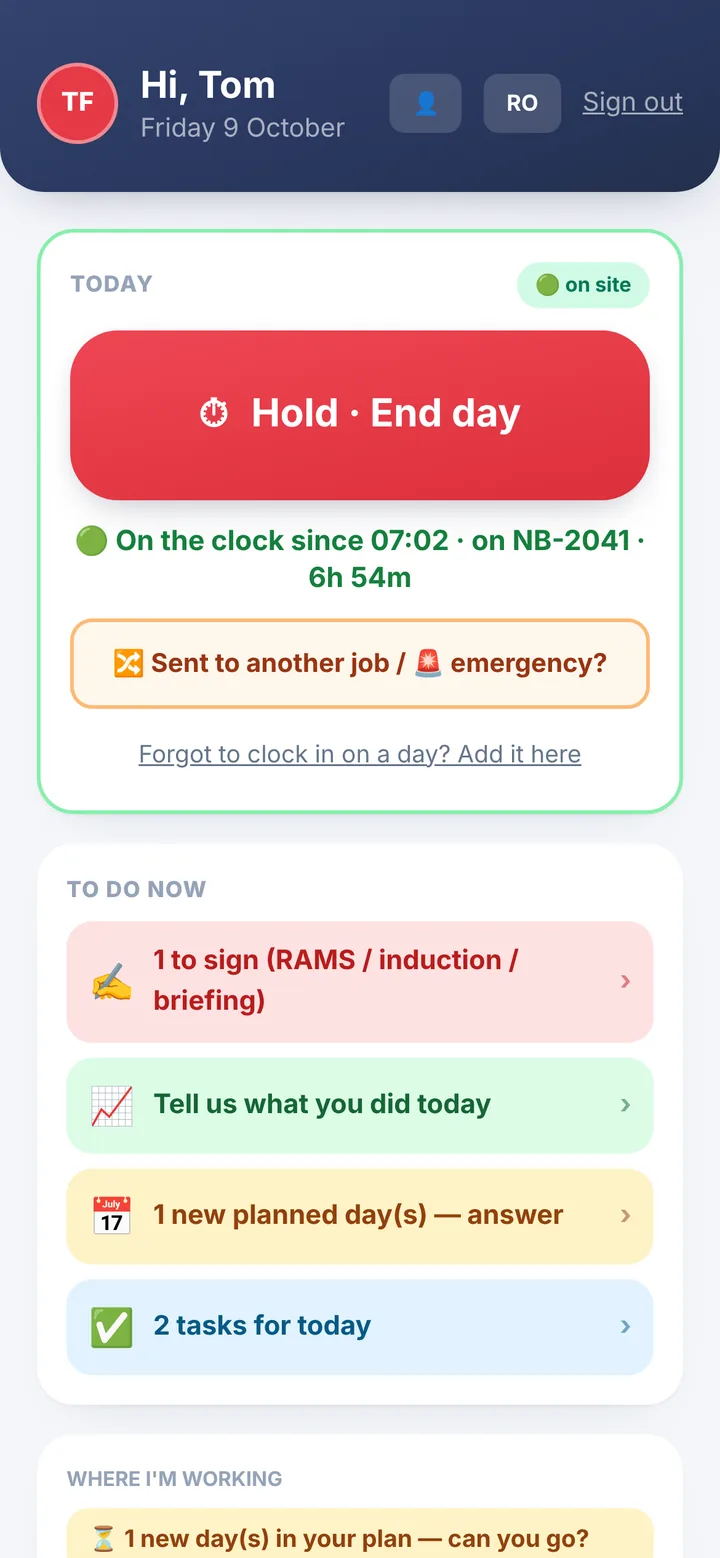
One screen, big buttons, nothing to learn
A worker opens the app and sees today: which job, a Start day button, and the things the office needs from them. Three steps are explained once, then the hours count themselves. Sign-in is by a six-digit code sent by SMS or email, so there is no password to forget.
- Clock in and out with one tap; the day is refused if it is already started from another phone. Forgot? Add or fix a day and the office checks it before pay.
- Today's tasks and drawings for the job they are on, ticked off as they go, plus overtime asked at End day.
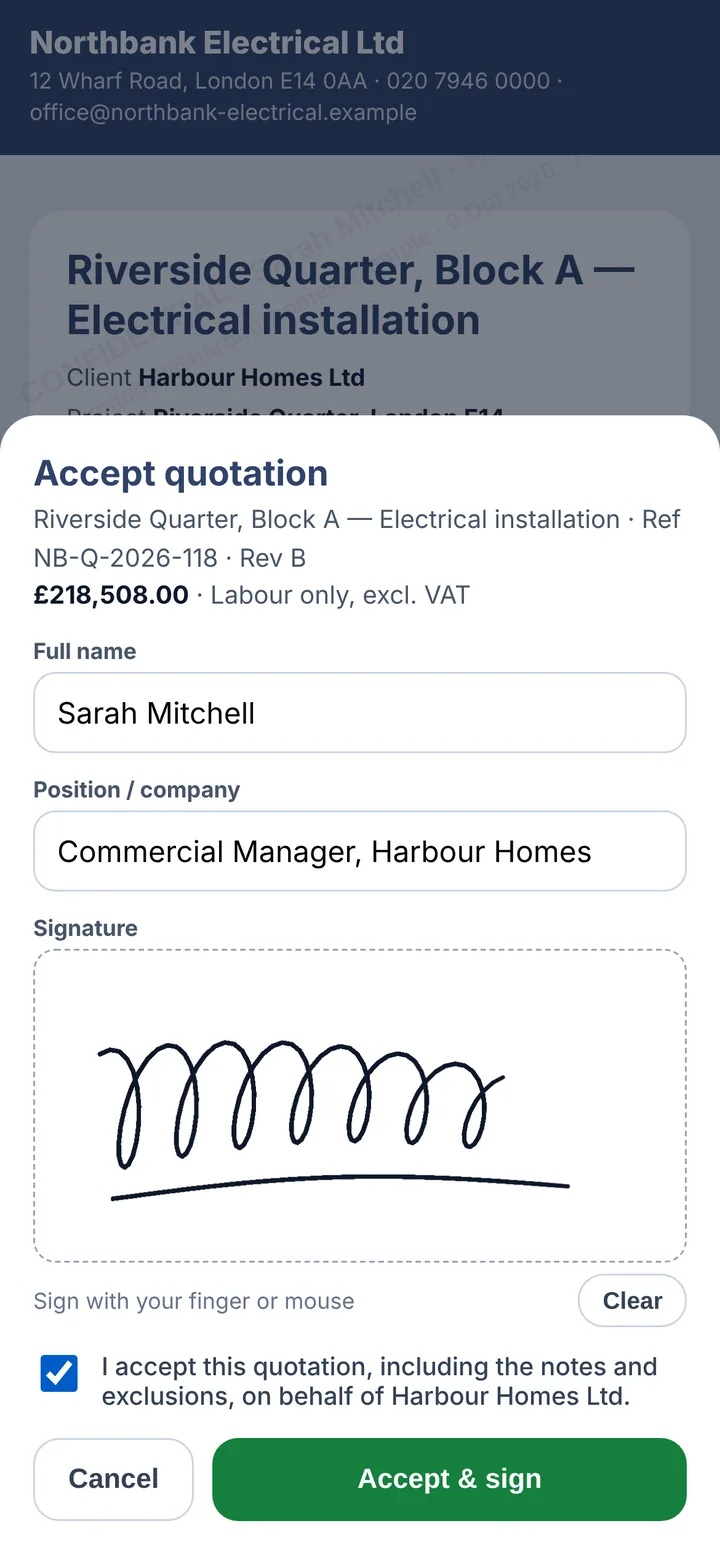
- RAMS, inductions and briefings read and signed with a finger, kept under "What I signed" to show on site.
- Photos, snags and material requests with the phone camera: before, after, progress or issue; a snag is closed with an "after" photo; materials by quantity and urgency.
- Extra work typed or dictated and sent to the office; day sheets for extra work can be handed over for the site manager to sign on the spot, then emailed as a dated PDF.
- "What I did today": how many flats, metres or percent finished, with no prices shown. The office approves it and it becomes the valuation.
- My ID badge, my pay, my week: an approved photo pass for the client, this week's estimate before CIS, the last eight weeks with "I got it" or "Not right", and holiday or sick-day requests answered in the app.
- Test sheets for electricians, site records for every trade: EIC, EICR and Minor Works readings circuit by circuit with checks as you type; pressure tests, commissioning, scaffold and excavation checks, fire stopping and sign-off with photos. Job notes stay on the job.
A supervisor can also clock in the people who have no phone, no battery or no account yet. More on the crew app
Expenses too
Bought something for the job with their own money? They photograph the receipt; it is repaid with pay once the office approves.
Moved mid-day?
One tap sends the afternoon to the new job or an emergency callout, even one not in the system yet. The morning stays on the first job.
Sign in with a code
Phone number or email, a six-digit code, no password. The office adds the person to Team and sends one join link.
Readable in the sun
Light, dark or like-the-phone theme. Light is easiest to read outdoors, so that is what the app suggests.
For the office on the move
The whole CRM fits in your pocket
Owners, admins and supervisors sign in to the same app and get the office, not a cut-down version. Inputs are sized for thumbs, dense grids collapse to two columns and tables scroll inside their own box, so you can do the Friday jobs from the van.
Jobs and progress
Open any job, see who started the day on it, approve the progress your crew reported and the flats they ticked through first fix, second fix, test, snagging and handover.
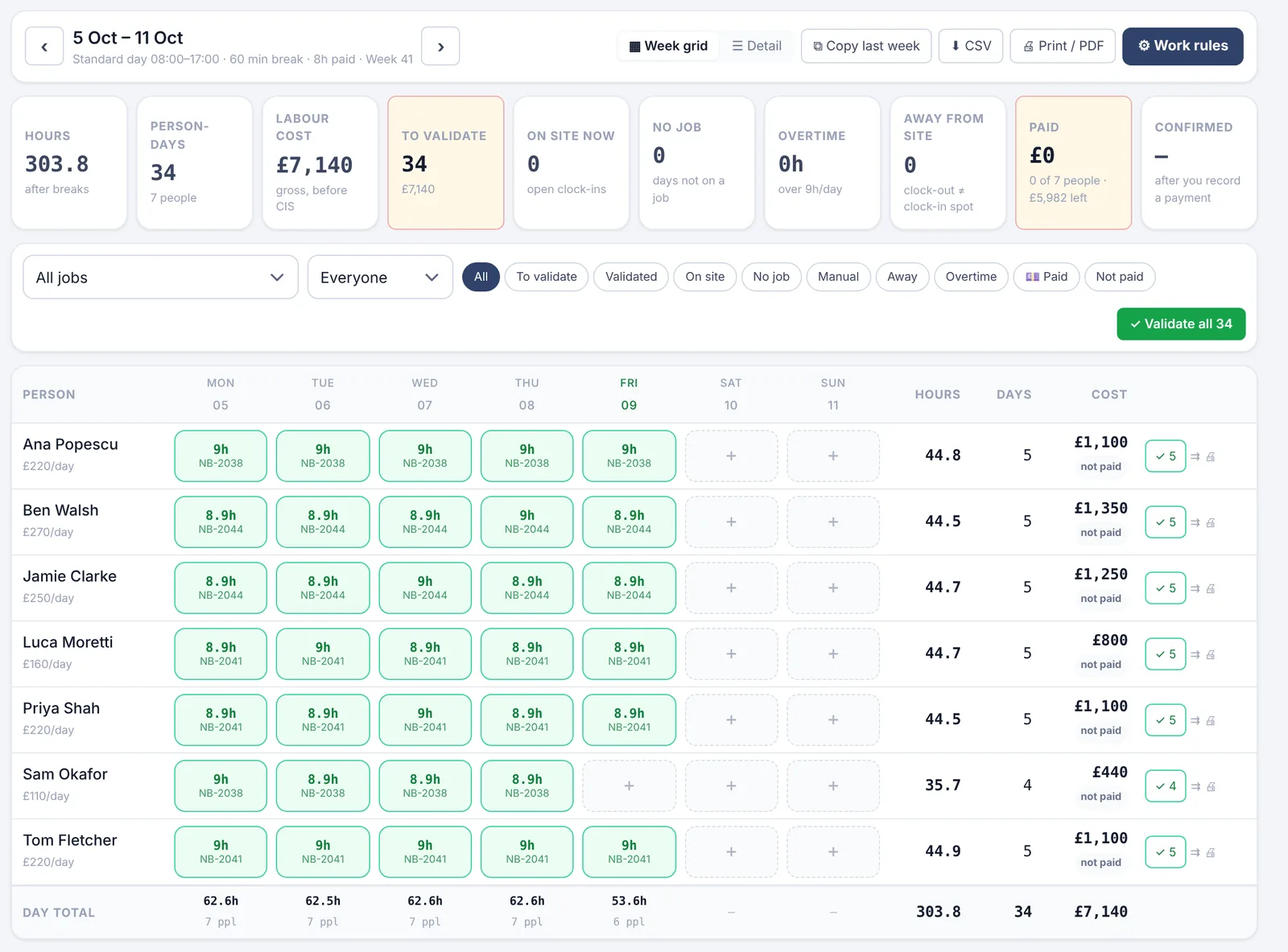
Approve the week
Check odd days, approve the pay week and send "£240 paid to you" so each person confirms they got it. "Close the week" tells you from Friday to Tuesday if a week is still open.
Callouts
A new callout from Leads picks the engineer and pushes it to their phone at once, with an SMS as well because it is urgent. They start their day on that job from the notification.
Test sheets review
The "To enter in NICEIC" queue in certificate order. Compare flats for copied or odd readings, send a sheet back to the electrician with a note, or attach the certificate PDF.
Handover pack
One PDF with the cover notes and warranties, every certificate, the test sheets on the IET forms and the client photos. Then "Ask for a review" while the client is still happy.
Money out and holidays
What went out this week, by job and by person, as cards on a phone. Approve or decline time off; the worker gets the answer in their app.
Graftum Pocket
Free for every worker, with or without a firm
Pocket is the worker's own record, separate from any company account. Someone paid by the day who moves between firms keeps every day, every receipt and every card in one place, and it stays theirs when they change firm.
- Days logged in two seconds: site, rate, full or half day, or start, finish and break with overtime at ×1.5 or ×2.
- Pay owed, per company: earned minus received, with a dated "Statement of worked days and payments" and a polite WhatsApp asking for the exact amount.
- Weekly invoice PDF for the self-employed, with the CIS 20% deduction shown and bank details on it.
- Cards wallet: a photo of every CSCS, ECS or other card, a warning before it expires, and one PDF of all of them for an employer or agency.
- Expenses and mileage: snap receipts, log work miles at HMRC 45p, and see the tax-year estimate of your CIS refund.
- Proof of work: dated photos on any day, site papers in a private vault, and the day-by-day record that settles "I'll pay you Friday".
Only the worker can see their Pocket. Not employers, not agencies, and Graftum's own panel shows totals only. About Graftum Pocket · Open Pocket
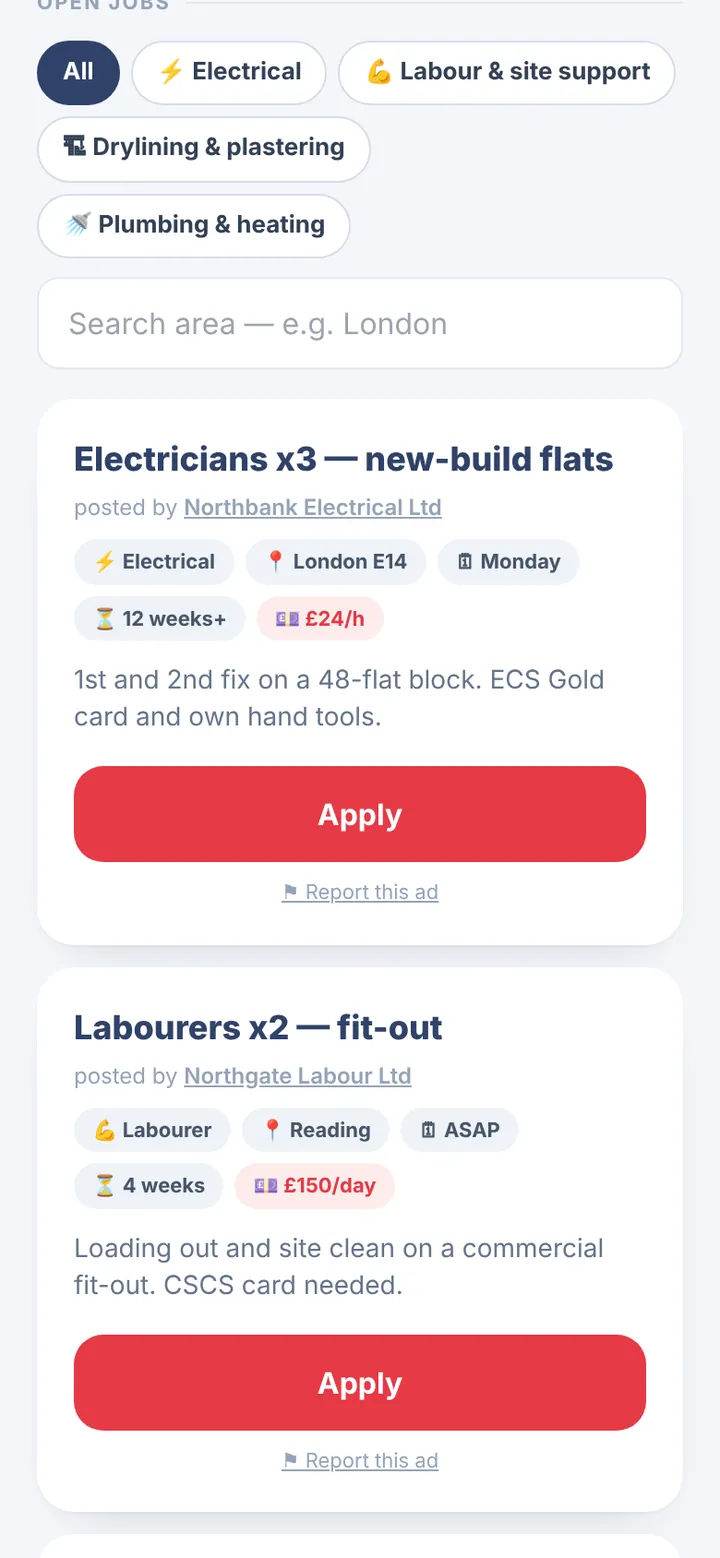
Jobs matched to you. The free jobs board, filtered to your trade and area, shows in Pocket and in the Friday email, and the application fills itself from your profile.
Notifications that matter
A handful of messages, each one worth a glance
Every message below goes to the Graftum app first, free, in the language set on that phone. Only people without the app get it as a text, and only if your company has SMS alerts switched on. Urgent callouts go both ways regardless.
- New job for today or tomorrow"New job for you tomorrow — Second fix @ Riverside." Sent when a manager assigns a task for today or tomorrow.
- Urgent callout"Urgent callout — open the app and start your day on this job." Push and SMS together.
- You've been paid"£240.00 paid to you for the week of 28 Sep. Tap to confirm you got it." Owners and admins only can send it; the worker confirms or disputes in My pay.
- Test sheet sent back"J-104 EIC — circuit 6 Zs missing. Open the app → My job → Test sheet." From the office review queue.
- Still on site?Twenty minutes after your company's finish time, anyone still clocked in is asked to tap End day. Once per day, and not for evening shifts.
- No Start day yetA morning nudge to someone who is scheduled on a job but has not tapped Start day. Off today? Ignore it.
- Time off answeredApproved or declined shows as a card in the app until the worker taps OK, with an email in English and Romanian and a text if SMS is on.
Two banners inside the app. Someone on an old version sees Update from the store; someone who turned notifications off sees how to switch them back on. Each appears at most once a day and can be closed. Browser visitors see neither.
Works on any phone
iPhone, Android, or just the browser
The app is a thin shell around graftum.com, so everyone is on the same version the moment we publish. Pick whichever is easiest for each person on the team.
iPhone and iPad
From the App Store. Notifications arrive straight from Apple; accept them on first open.
Android
From Google Play (com.graftum.mobile). Notifications via Firebase; the same screens as iPhone.
Any browser
graftum.com/m for the crew, graftum.com/app for the office, graftum.com/pocket for Pocket. Phones visiting the site get a "Get the app" button pointing at the right store.
Home screen, no store
Pocket can be added to the home screen and opens like an app: the browser's own install prompt on Android, Share → Add to Home Screen on iPhone. The helper explains the steps in the worker's language.
No signalBasements and new builds
- Start day and End day are saved on the phone and sent when signal returns; a banner shows how many are waiting, with Send now.
- Test sheets keep a draft on the phone until the server has it, up to 15 at a time, and tell you "kept on this phone, try again" if a save fails.
- Day sheets queue the same way and send themselves when back in signal.
Small things that matter on siteBuilt for gloves and sunlight
- Light, dark or like-the-phone theme; light is easiest to read in the sun.
- Big keypad for test readings; dictation for notes and extra work where the phone supports it.
- The crew screen refreshes when you come back to it, not every minute, so a half-typed note or signature is never lost.
Privacy on the phone
No tracking. Clear lines between worker and office.
Clocking in with a phone should not mean being followed by one. Graftum records a location once, at the tap, and nothing in between. The office sees what it needs to run the job and pay people right; the worker sees their own record and nothing about anyone else.
What the worker seesTheir own day, pay and documents
- Their days and hours, this week's estimate and the last eight weeks of pay, with a button to dispute a payment.
- Only the jobs they are put on, with the tasks, drawings and notes for those jobs.
- What they signed, their ID badge and their own details. They can fix their own day; it goes to the office to approve. They can never edit anyone else's.
- Their Pocket, which no company can open.
What the office seesEnough to run the job and pay correctly
- Who is on the clock, since when and on which job; a 📍 flag if a day was started far from the job address, never a route or a live position.
- Photos, snags, material requests, progress reports, extra work and test sheets sent from site.
- Pay details a worker enters (bank, NI, UTR, address) are visible to their own company's office only, so they can be paid.
- Pay texts can be sent by owners and admins only; a worker's session cannot send messages in the company's name.
Access is enforced in the database, not just hidden in the app. How Graftum protects your data · Your data guarantee · Delete your account
Questions about the apps
Do my workers need the app from the store, or does the browser work?
Both work. The crew screen is a web page at graftum.com/m, so any phone browser runs it. The App Store and Google Play apps load the same screens and add push notifications, which a browser tab cannot receive. Because the app loads its screens from graftum.com, new features arrive without a store update.
Does the app track where my workers are?
No. Location is stamped once, at the moment someone taps Start day or End day, with a four-second timeout; the tap goes through even if the phone refuses location. Nothing is recorded in between. The office sees a flag if a day was started far from the job address, never a map of anyone's movements.
What happens when there is no signal on site?
Start day and End day are saved on the phone and sent when signal returns; the app shows how many are waiting and a Send now button. Electrical test sheets keep a draft on the phone until they reach the server, and day sheets queue the same way.
Which languages does it speak?
The crew app is in English and Romanian, with one tap to switch; push notifications arrive in the language set on each phone. Graftum Pocket is in English, Romanian, Polish, Bulgarian, Ukrainian, Spanish and Portuguese.
Can a worker see other people's hours or pay?
No. A worker sees their own days, their own pay, the jobs they are put on and what they signed. Their bank, National Insurance and address are visible only to their company's office. Nobody at the company can see a worker's Graftum Pocket.
Will I have to keep updating the app?
Rarely. The app loads its screens from graftum.com, so most changes appear the next time it opens. When a store update is genuinely needed, for example the build that added push notifications in October 2026, the app shows an "Update from the store" banner once a day until it is done.
Put the site in your crew's pockets this week
Start free for three months, paste your crew from WhatsApp or Excel and send one join link. They install the app, sign in with a code, and press Start day on Monday.